How to Check LESCO Bill Paid or Not

Ever wondered if your LESCO bill was actually paid or not after you made the payment?
Many Lahore Electric Supply Company (LESCO) customers forget to double-check their electricity bill status and only realize later when they see an “Unpaid” mark or face a late payment charge.
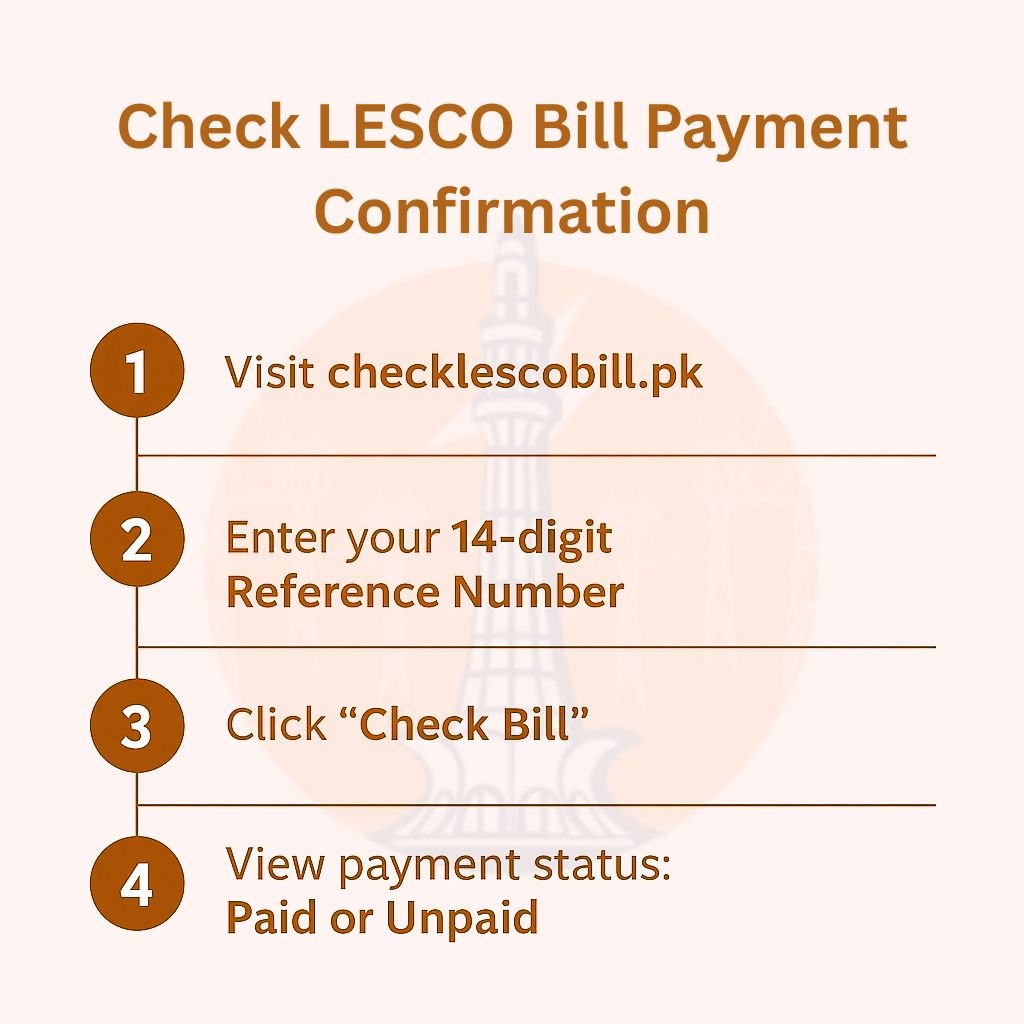
To check if your LESCO bill is paid or not in seconds, visit checklescobill.pk, enter your 14-digit reference number, and click “Check Bill.” The payment status (Paid/Unpaid) will appear instantly.
You can also check it through mobile apps, SMS, or even your bank.
Instant LESCO Bill Check (Paid or Unpaid)
Check Your Electricity Bill
Use your 14‑digit Reference No or your Customer ID. We’ll open the official LESCO page.
Opens the official LESCO (PITC) bill page.
The Best Way to Check If Your LESCO Bill is Paid or Not
The easiest and most reliable way to check your LESCO bill payment status is through CheckLESCOBill.pk. This website lets you:
- Instantly view your latest LESCO bill online.
- See whether your bill is paid or unpaid.
- Download or print a copy for your records.
- Track previous months’ bills and payments in one place.
All you need to do is:
- Visit checklescobill.pk
- Enter your 14-digit reference number (from your printed bill).
- Click “Check Bill” to instantly view your LESCO bill details and payment status.
It’s a fast, user-friendly way to confirm whether your electricity bill has been cleared without navigating multiple pages or logins.
Smart Tip: Many people search “LESCO bill paid or unpaid check online”. Using CheckLESCOBill.pk ensures you get your bill data directly from LESCO’s database, updated in real-time.
Other Ways to Check If Your LESCO Bill is Paid
Apart from using our recommended method, LESCO also offers several other ways to confirm if your bill has been paid. Here’s how you can do it quickly from anywhere.
1. Through LESCO’s Official Website
The most reliable and quickest way to confirm your LESCO bill paid or unpaid status is through the official LESCO online portal.
It allows you to check your month’s bill status, verify previous payments, and ensure your account is up to date, all within seconds.
Here’s the step-by-step process to check if your LESCO bill is paid or not:
- Visit the official LESCO Bill Check website.
- Click on “Customer Services” → “View Bill” (or directly use the LESCO online bill check page).
- Enter your 14-digit Reference Number → you can find it on the top left corner of your printed electricity bill.
- Click on “Submit” or “View Bill.”
- Your bill details will appear instantly on the screen. Under the payment section, you’ll see whether the bill is Paid or Unpaid.
You can also view your previous payment history to confirm earlier transactions or verify if any old dues remain.
Pro Tip: Many users search for “LESCO bill paid or unpaid check” online. This official method gives you the most accurate and up-to-date information directly from LESCO’s billing system.
2. Check LESCO Bill Payment Status Through Mobile Apps
If you prefer using your smartphone, you can easily check your LESCO bill payment status through official and third-party mobile apps.
These apps make it convenient to verify whether your electricity bill has been paid or is still pending. So you don’t need to visit the LESCO website every time.
Here’s how you can do it:
- Download the official LESCO Light App (available on Android and iOS) or use the WAPDA Bill App if supported in your area.
- Open the app and go to the “Bill Inquiry” or “View Bill” section.
- Enter your 14-digit Reference Number printed on your electricity bill.
- Tap on “Check Bill” to view your current month’s bill and payment details.
- If your bill shows a “Paid” mark or zero balance, it means LESCO has successfully received your payment.
Apart from official apps, you can also verify your bill payment through popular mobile banking and wallet apps such as:
- Easypaisa
- JazzCash
- HBL Mobile
- Meezan Bank App
After you pay, these apps show a paid receipt or confirmation message in the payment history section. This helps you verify that your LESCO bill has been cleared.
3. Check LESCO Bill Paid Status via SMS
LESCO offers an official SMS service that updates customers about their electricity bills. Although this service mainly provides bill alerts and notifications, some users may also receive payment updates.
To register:
- Open the message app on your phone.
- Type REG [your 14-digit Reference Number].
- Send it to 8118.
You will receive an SMS from LESCO with your bill details. If the message shows Paid, your bill has been updated. If it shows Unpaid, the payment is still pending or has not yet been reflected.
4. Verify LESCO Bill Payment Through Your Bank or Wallet
You can confirm your LESCO bill payment through your bank or mobile wallet account. These platforms provide instant updates and records of your transactions.
Here’s how you can check:
- After paying your bill, you will receive a confirmation message from your bank showing the transaction amount and time.
- Log in to your mobile banking app and open the transaction history to view your latest LESCO bill payment.
- Open the app that you are using, it may be Easypaisa or JazzCash, go to the “Payment History” or “Bills” section, and check the status of your last transaction. It will show whether your LESCO bill has been paid or is pending.
Always save your digital receipt or screenshot after each payment for future reference or verification.
5. Review Your Next Month’s Bill
Another simple way to confirm payment is to check your next month’s LESCO bill.
If your last payment was successfully processed, the “Previous Dues” section will show zero or will only include your new month’s charges.
If it still shows the previous amount as due, that means your last payment didn’t get recorded properly and you should contact LESCO support to fix it.
Common Reasons Your LESCO Bill Appears “Unpaid”
Sometimes your LESCO bill may still appear unpaid even after you’ve paid. This usually happens due to minor system or update delays. Here are the most common reasons and their quick fixes:
1. Delay in Payment Update (24–48 Hours)
Payments made through banks or apps may take up to two days to reflect in the LESCO system.
Solution: Wait 24–48 hours and check again.
2. Technical Issues in Online Systems
Temporary server or connection problems can cause your payment status to show incorrectly.
Solution: Refresh or revisit the website after some time.
3. Wrong Reference Number Entered
Entering an incorrect or incomplete reference number can result in your payment not being linked to your account.
Solution: Double-check your 14-digit reference number before paying or verifying your bill.
4. Late Bank Synchronization
Some banks update their records later than others, causing short delays in showing paid status.
Solution: Recheck your payment history or bank app after a few hours to confirm.
What to Do If Your Bill Shows Unpaid After Payment
If your LESCO bill still appears as unpaid after you have made the payment, follow these simple steps to resolve the issue:
- Reconfirm Payment on Your Banking App: Open your mobile banking or wallet app and check your recent transactions to confirm the payment was deducted.
- Visit the Nearest LESCO Customer Service Center: Go to your local LESCO office for manual verification of your payment record.
- Carry Your Last Paid Bill and Transaction Slip: Bring a printed or digital copy of your last paid bill along with the payment receipt or bank slip for verification.
- Contact the LESCO Helpline or Email Support: Call 111-000-118 or email the LESCO support team with your reference number and payment details. They will verify your payment and update your bill status.
Tip: Always keep a screenshot of the payment confirmation or receipt for your records.
FAQs
How long does it take for the LESCO payment to show as paid?
It typically takes 24 to 48 hours for your payment to be processed as paid. Mobile app payments may update instantly, while the LESCO site can take longer.
What should I do if my bill still says unpaid after 3 days?
If it still shows unpaid after 3 days, check your bank or wallet history. If payment has been deducted, contact the LESCO helpline (111-000-118) for assistance.
What should I do if my LESCO bill still shows unpaid after payment?
Wait 24–48 hours — sometimes the system updates late. If it still shows unpaid, check your bank app for the deduction and call the LESCO helpline with your receipt.
Is there a way to confirm my LESCO bill payment without a reference number?
Yes, you can check your bank or wallet app’s payment history. But to verify it officially on LESCO’s site, you’ll need your 14-digit reference number.
How to track if my LESCO bill payment failed?
Check your bank or app transactions. If no amount was deducted or no receipt shows up, the payment didn’t go through.
Conclusion
LESCO bill payment status check is a simple way to manage your electricity bill responsibility, as it prevents undesirable circumstances such as late payment fees or unexpected disconnections.
Regardless of how you’ve paid your bill, it is always a good practice to verify that the payment has been posted to the account and is showing a ‘paid’ status in the system.
You can use the free online LESCO Bill Calculator to estimate your monthly bill based on the units you’ve used. And while you’re at it, don’t forget to check your LESCO bill paid status to make sure your electricity payment has been successfully received.